
Example of a Product Breakdown Structure
It is very common practice to introduce a hierarchical breakdown of a project according to the products or systems. This is known either as a Product Breakdown Structure (PBS) or System Breakdown Structure (SBS). There are a number of ways to introduce this into the DOORS database. You could use an attribute in every module with an enumerated list containing all the PBS values. The disadvantage of this approach is that when you have to make a change to the list (and this is more common than people think) then the type has to be changed in every module. Whilst this is easy to achieve using the Module Administration tool (see Module Administration utility), the second disadvantage is that you cannot actually see a hierarchy in a flat list of elements. You also cannot see a combined list for all modules. So, if you wanted to see requirements allocated to System X then you would have to search all modules and somehow collate the results together.
A more effective approach is to build a PBS into a standalone module. This has a number of advantages:
- The hierarchy is immediately obvious;
- The list can be easily changed;
- The item can have additional attributes such as a description;
- By linking requirements to items in the PBS it is possible to display the values as a DXL attribute; and
- Most importantly, by viewing the requirements from the perspective of the PBS you can see the impact of making a change to the PBS– before making the change. Impact analysis is greatly enhanced.
The principle can be adopted for any hierarchical list. For example, hazards can be broken down into causes.

Example of a Verification Breakdown Structure
The same principle for a PBS can be applied to a Verification Breakdown Structure (VBS). In fact, using DOORS as a relational database, it can be applied to any form of enumeration (Organisation Breakdown Structure (OBS) or Work Breakdown Structure (WBS) although over-use can result in spaghetti-like links.
The Verification Methods would be defined in the Verification Breakdown Structure, or its equivalent, and therefore it is very easy to identify all requirements that will be affected by a single Verification Method by looking at all the links from the VBS module. This permits the use of multiple Verification Goal modules structuring and ordering the Verification activities according to operational rather than functional needs. This approach makes the generation of the Test Procedures/Test Schedules very controlled as the modules provide the framework.
Another point to note is that there should always be a strict data model enforced within the database with reserved words for the link relationships. More details on how CiGi Technology can help you produce a data model can be found in Consultancy Services.
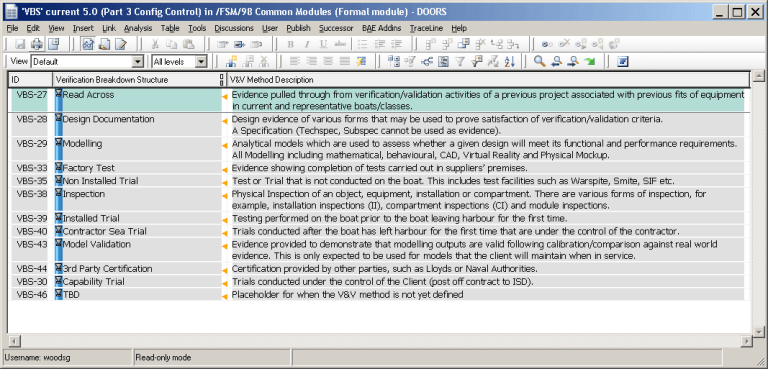
DXL Attributes can be used to show the results of the link.
Example of the use of References/Evidence Lists
It is commonplace to see in a requirement statement the phrase “in accordance with xxx” where xxx is the title of a reference or “ … in accordance with Reference nnn” where nnn is a unique number assigned to a reference. How is this managed in DOORS so that the references are controlled and that any change is propagated through the whole of the project?
In particular, it is very important to know the issue or version referenced from a requirement as any change in content may significantly affect a requirement and initiate an impact analysis (that determines what would be the impact of changing a reference). Unfortunately, there is nothing readily available in DOORS Classic that can help.
However, what we can do is to build a reference or evidence list. A reference list would contain all the documents that are referenced by the requirements. As well as the mandatory attributes such as the document reference number, title and version/issue we could add additional information such as the document type, who authored the document and when it was issued.
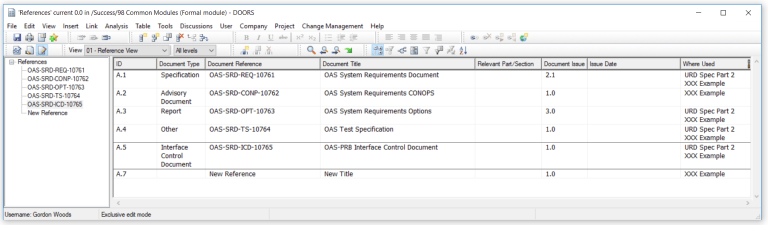
The question of what requirements would be affected can be automated using DXL to provide the identification of where it is used. Thereby considerably reducing the amount of time that the management of external and internal referenced documents would take for an organisation.
An evidence list has similar properties but it is used to identify documents external to DOORS that are used in the evidence trail. For example, Standard Operating Procedures, Test Cases, Test Reports etc.

Additional attributes may include Verification or Validation identification and external hyperlinks to a document repository. The important thing to note is that the traceability from evidence to the requirements is continuous.
In these examples we are using an internal repository module/table. We could have alternatively used direct traceability links such as provided by Open Services for Lifecycle Collaboration (OSLC). Support on OSLC synchronisation to external document repositories such as Aconex, Documentum or TeamBinder is also available.
Example of the use of Abbreviations
It is extremely useful if Abbreviations are defined either at the Company or at the project level. This will prevent misunderstanding if the same abbreviation has different meanings on different projects. An example of this could be ‘PBIT’ which could mean either “Power up BIT” or “Periodic BIT”. A misunderstanding in the use of this term between teams could lead to totally different functionality resulting in significant interface issues and rework.

In this type of implementation then a sophisticated DXL Attribute is used to display the ‘Where Used’ values – there are no links involved.
It is interesting to note that this functionality is already available in DOORS Next.
Example of use of a Glossary
A data repository is always needed because words can have different meanings in different contexts. They also can be highly specific:
- Identification – A user (person or system) must supply an identifier and/or the system must in turn supply an identifier to the user so that the user knows that he is accessing the right system.
- Authentication – The identity of the user must be authenticated (i.e., verified so that we know that the user is who/what the identifier is associated with). That is, authentication is the verification of the identity assigned during Identification.
- Authorization – Once a user has been identified and the user’s identity has been authenticated, the user can use the services and access the data that the user is authorized to use and access. This can be done by membership in a group or done on an individual identifier basis.
Use of italics and/or Capitalisation of a word is often used as a means of indicating a glossary item, so that it is clear to the reader that it is not just a word in a sentence, but it has a defined meaning. A parser can now check the specification for undefined terms.
A glossary in a requirements specification, and which is project wide, is absolutely essential as it provides the precise definition of all terms.
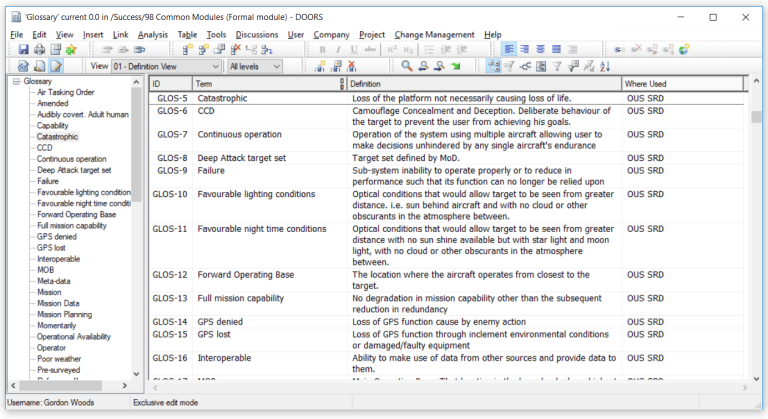
In this type of implementation then DXL Attributes are used to display the ‘Where Used’ values – there are no links involved. As with the Abbreviation terms, then this functionality is already available in DOORS Next.
For information on a DXL Script that pulls all these features together then click here.