Simple Scripts – Identifying all DXL attributes in a database

This simple script is used when you get a DXL attribute error but do not know which module is causing the error (which is very common) or when the DOORS administrator wants to identify the DXL attributes in all the modules. Perhaps prior to combining or modifying a specific function.
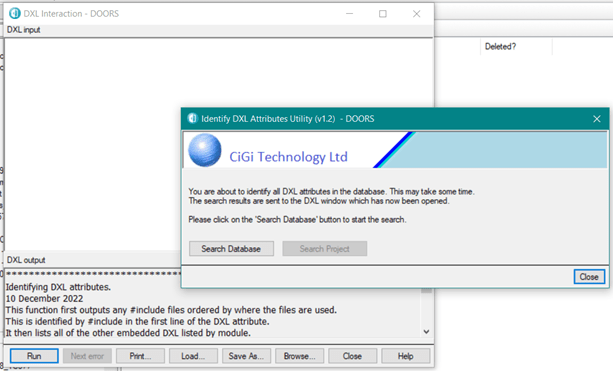
DXL script to find all DXL attributes in the database

IIf a project is selected before the utility is run, then both buttons are enabled. The user can choose to search the whole database, or limit the search to just the selected project.

DXL Script to find all DXL attributes in a specific project

Depending on the user choice the script then interrogates all modules in the database or the current project, and because this may take some time, then a progress bar is displayed:

Wait progress bar for the DXL Script

When the DXL script completes, it lists the names of the DXL attributes in the DOORS interaction window.

Results page to find all DXL attributes in the database

You can then use the Module Administration utility to confirm and manage the DXL attributes.

Using Common Modules

The Display Meaning Tool is designed to work with a number of common modules for Abbreviations, Glossary, References and Standards. These can be project or company-wide.

All entries are loaded from the modules when the tool starts and compared to the attributes for the current Object. Matched terms and their meanings are displayed. No links are involved.

Display Meaning Tool

The tool can also be used to add, delete or edit existing entries in any of the common modules and there is also functionality to open the original source document using its URL.

Simple Scripts – DXL Attributes

The uses for DXL attributes are enormous. They range from showing the specific content from links, or multiple links, or multiple hops through links, calculated values, filtered values etc.

Layout DXL can be easily generated by a user with the inbuilt traceability wizards.  Primarily for performance reasons, Layout DXL should always be converted to a DXL attribute (again using the DOORS inbuilt functionality). But there are other advantages:

Although the code of a DXL attribute can exist within a module it is more commonly referenced to an external include file. This has the significant advantage of reuse. If a script is located in the addins folder then once that file is modified the changes are instantly propagated to all modules that use this attribute ensuring consistent use across the project. Of course, you only have to make a single modification.

You can even have a single include file with all the required functions embedded within it.

For example:

Example of a DXL script containing multiple DXL functions

This has the advantage that common functions for displaying text from buffers are all in one place.

The DXL attribute then consists of an include to this file and then a call to the appropriate function.