This utility counts the number of projects, modules and objects in the entire database. It is a simple script that is either run from a menu or loaded into the database DXL interaction window
There is a Boolean constant in the code that, if set, will print out the names of the folders and modules being searched. This is useful for debugging and for looking to see where any DXL attribute errors are located (if present, then these will be made visible when the module is opened by the script).
It doesn’t use recursion to delve down through the database structure but uses the itemRef in a ‘for’ loop through each project. This means that the order will be different to the hierarchy but since we are only interested in counts then that’s not a problem.
It will exclude deleted objects, deleted modules and deleted projects. The results are displayed in the DXL interaction window.
Global Metric Count Tool – DXL Interaction window output
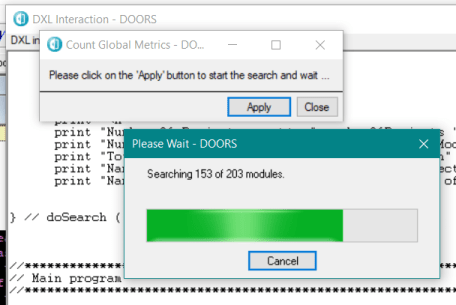
The script opens up every module in the database so it can take a long time. A progress bar is therefore used to display the current position in searching through the database.
Gblobal Metric Count tool – Progress Bar
But perhaps the most significant aspect of this tool is that it can be easily adapted to collect other information as it parses its way through the projects and modules.
When two companies are using DOORS and need to exchange information then the requirements are often provided from one company to another by means of DOORS module archives (.dma). This means that the version that you have been working with your own changes is now superseded by a new module.
You may also have used modules as separate baselines or as variants whilst trying out combinations of requirements.
So how do you identify the differences between the versions before you update your module? A comparison of 2 modules is part of classic DOORS but it works by comparing text, attempting to match similar text. Unfortunately, if you have a lot of commonality in the requirements, then it will match, (apparently at random) completely different requirements and give totally incorrect results.
This wizard based utility solves this problem by using the DOORS Id (which is constant between versions) as the key. Note that it can be adapted to work with other data models which use other attributes as a key by simple DXL changes.
Module Compare Wizard – start screen
The start screen introduces the utility. Notice that it has been designed more or less along the same lines as a DOORS wizard. Some introduction text on how to use the utility is displayed. The script automatically checks that the user is part of a group that can run the utility. This allows the utility to be placed on a generic DOORS menu.
Module Compare Wizard – Identification screen
The second ‘Identify’ step allows the user to identify the two different versions of a module. A log file is always created, and the user will also determine where this log file will be saved. This log file will contain the result of the comparison and can be examined by any text editor. This is very useful when the comparison is of modules that contain thousands of requirements
As well as the comparison matching the requirements, authorised users will have the ability to permanently create links between the matched objects so the associated link module can be optionally added in this screen. Normally this is set to ‘compares’ and links will be automatically created via this link module to link matched requirements.
The ‘Next’ step performs the comparison and shows the changes between the 2 modules.
Module Compare Wizard – results screen
Selecting a specific ID will show the Old text, the New text and the difference using the standard colours and fonts. Objects that contain graphics and pictures are ignored. If the right attributes are present in the new module, then comments can also be added.
For modules that contain a lot of requirements, then filters can be applied.
Metrics such as the number of requirements are also displayed for both versions of the module.
If a user has the necessary privileges, and if the link module has been defined, then once all the objects have been examined and checked then permanent links between the matched objects can be established.
The Software Application IBM® Rational® DOORS® embodies a capability for
customising the default tool-set using an adaptation of the C++ language called
DOORS eXtension Language or DXL.
This language is a powerful tool when used correctly, as it
can automate repetitive tasks, customise the look and feel of DOORS to meet
specific needs, and process and manipulate large amounts of data within the
DOORS database with little or no user interaction.
CiGi Technology have a vast library of functions and
utilities that will reduce the administration burden of Users and DOORS
database administrators and that streamlines the development of bespoke DXL
scripts for DOORS 9.x.
All code produced is extremely robust, vigorously tested and checked to conform to our own exacting high standard as defined in the CiGi Technology DXL style guide . The code is always transportable and guaranteed to be database independent. The functionality has been checked for applicability up to DOORS version 9.6.1.10.
As well as standard DXL Attributes and a wealth of utilities, CiGi Technology welcome the opportunity to develop tailor made solutions. Please contact us for more information.
To view the complete manual in pdf click here (please note that this is still work in progress and some sections that are not yet posted will not be complete). It will take a few seconds to load but its worth the wait:
No one should be editing DXL without this unique publication built on decades of experience. To view an example of the DXL style guide in pdf click here. It will take a few seconds to load but its worth the wait: